Architecture & Workflow Overview
This page provides a high-level introduction, conceptual workflow, and block-diagram–driven understanding of the GRaTeR-JAX codebase. It is intended to help new users and contributors quickly understand how the different components fit together: from user scripts and notebooks, through optimization logic, down to JAX-compiled disk models and gradients.
Installation
To install GRaTeR-JAX and its dependencies, create a new Conda environment with Python and run:
pip install grater-jax
Make sure you have JAX installed with the correct backend for your hardware:
pip install --upgrade "jax[cpu]" # or "jax[cuda]" for GPU
Highly recommended to install this on a fresh environment, just to be safe.
1. What is GRaTeR-JAX?
GRaTeR-JAX is a JAX-native, differentiable implementation of the GRaTeR scattered-light debris disk framework from Augereau+ 1999. It is designed to:
Model scattered-light images of circumstellar debris disks
Enable gradient-based optimization and probabilistic inference (MCMC)
Run efficiently on CPU/GPU via JAX JIT compilation
The library cleanly separates:
Physical disk models
Objective functions (likelihoods + gradients)
Optimization / inference orchestration
2. End-to-End User Workflow
At a high level, a typical GRaTeR-JAX workflow looks like:
Define a disk model (density profile, scattering phase function, PSF handling)
Specify initial parameter guesses and model configuration
Load a target image, error map, and optional empirical PSF
JIT-compile the forward model and gradients
Run either:
Deterministic optimization (SciPy), or
Bayesian inference (MCMC)
Inspect best-fit parameters and diagnostics
This flow is summarized visually in the block diagram below.
3. High-Level Optimization Flow Diagram
The diagram below represents the conceptual optimization pipeline exposed to the user.
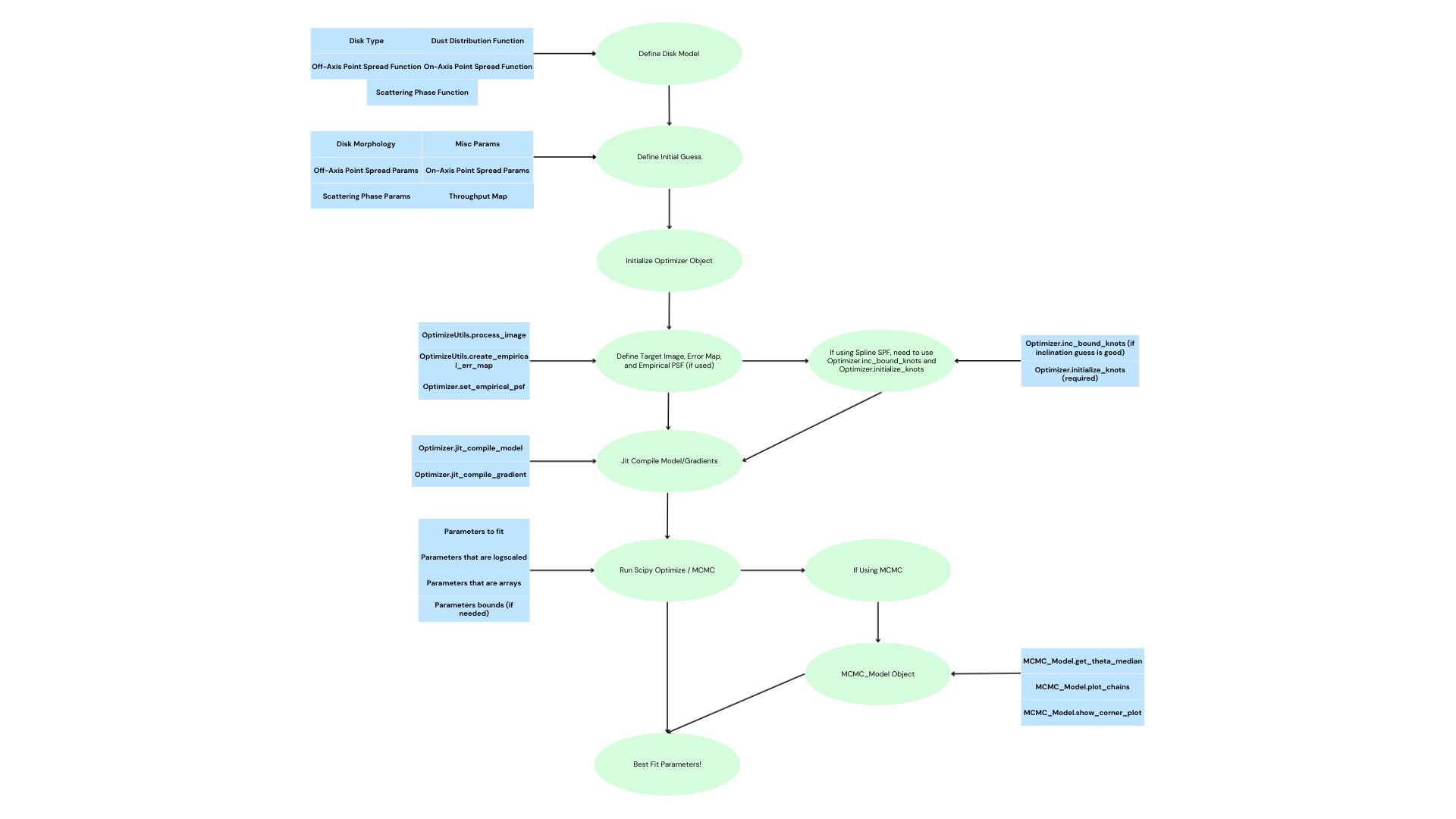
Key stages
Define Disk Model
Dust distribution
Scattering phase function (SPF, e.g. Henyey-Greenstein vs. Spline)
On-axis / off-axis PSF handling (Optional)
Define Initial Guess
Morphological parameters
SPF parameters
Throughput maps / misc parameters (e.g. distance to system, flux scaling)
Initialize Optimizer
Creates a central object coordinating data, parameters, and JAX functions
Target Image & PSF Setup
Image preprocessing
Error map construction
Optional empirical PSF injection
JIT Compilation
Forward model
Gradients (analytic via JAX automatic differentiation)
Optimization / MCMC
SciPy minimization or
MCMC sampling
4. Internal Code Architecture
GRaTeR-JAX is organized around a clean separation of concerns. The diagram below shows how the main modules interact.
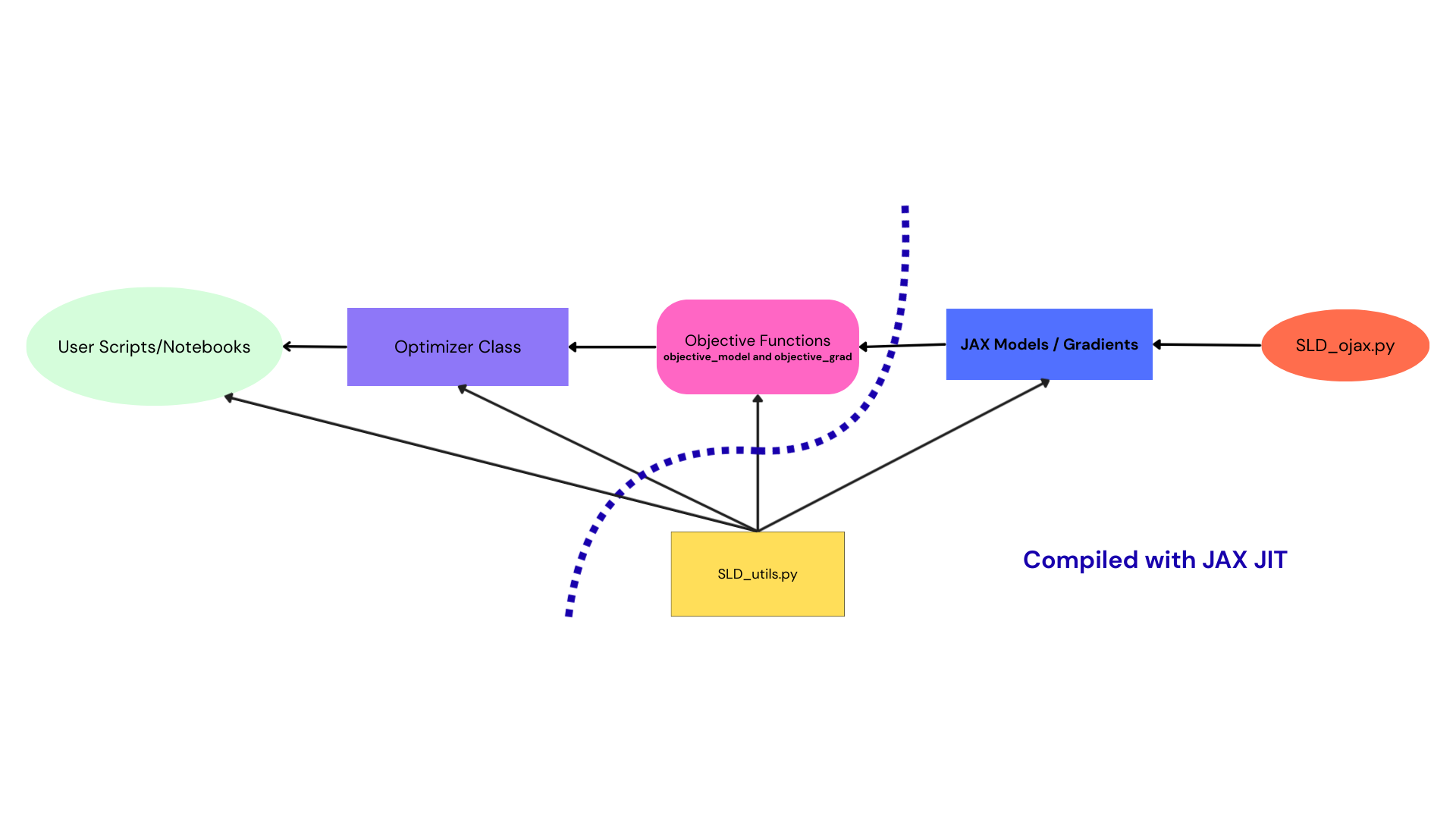
Core components
User Scripts / Notebooks
Entry point for most users
Define models, parameters, and run fits
Examples:
DiskTutorial.ipynbFitsTutorial.ipynbSpeedComparision.ipynb
Optimizer Class
Central orchestration layer
Owns:
Parameter vectors
Bounds and transforms
Links to objective functions
Objective Functions
objective_modelobjective_gradWrap JAX disk models into scalar likelihoods
JAX Models / Gradients
Pure, functional disk forward models
Fully differentiable
No side effects
SLD_utils.py
Shared utilities:
Image preprocessing
PSF handling
Data normalization
Used by both:
Objective functions
Optimizer logic
SLD_ojax.py
Low-level JAX disk model definitions
Performance-critical code
5. JAX JIT Compilation Strategy
One of the key design goals of GRaTeR-JAX is performance without sacrificing clarity.
Disk models are written as pure JAX functions
Objective functions wrap those models
The optimizer JIT-compiles once, then reuses compiled kernels
This results in:
Massive speedups over legacy NumPy implementations
Stable gradients for both optimization and MCMC
Identical code paths for CPU and GPU execution
6. Where to Go Next
Getting started
DiskTutorial.ipynbFitsTutorial.ipynb
Performance benchmarking
SpeedComparision.ipynb
API reference
See module-level documentation in the optimization and disk_model subpackages
This page is intentionally conceptual. Once this mental model is clear, the individual APIs and classes should feel significantly easier to navigate.